DynamoDB Serverless Todo App — When Key-Value Clicks
Day 4 introduced Lambda and API Gateway with a basic three-endpoint API. Day 8 takes that foundation and builds something real on top of it — a full CRUD todo application backed by DynamoDB, with status tracking, timestamps, and conditional updates.
But the technical deliverable isn't what made Day 8 significant. It's the moment where DynamoDB stopped feeling like a weird limited database and started feeling like the right tool for certain problems.
That mental shift is what this post is really about.
The DynamoDB mental model shift
Every developer who comes from a relational background hits the same wall with DynamoDB. You look at it and think: where are the tables with columns? Where's the JOIN syntax? How do I query by anything other than the primary key?
The answer is: you don't. And that's not a limitation — it's the design.
DynamoDB makes one guarantee: single-digit millisecond reads and writes at any scale, forever. To make that guarantee it has to know exactly where every item lives before touching storage. That means every read and write must go through the partition key. No full table scans in production. No arbitrary queries. You design your keys around your access patterns, not the other way around.
Once that clicks, everything else makes sense.
Architecture overview
Four routes. Four Lambda functions. One table. One IAM role with exactly the permissions needed — nothing more.
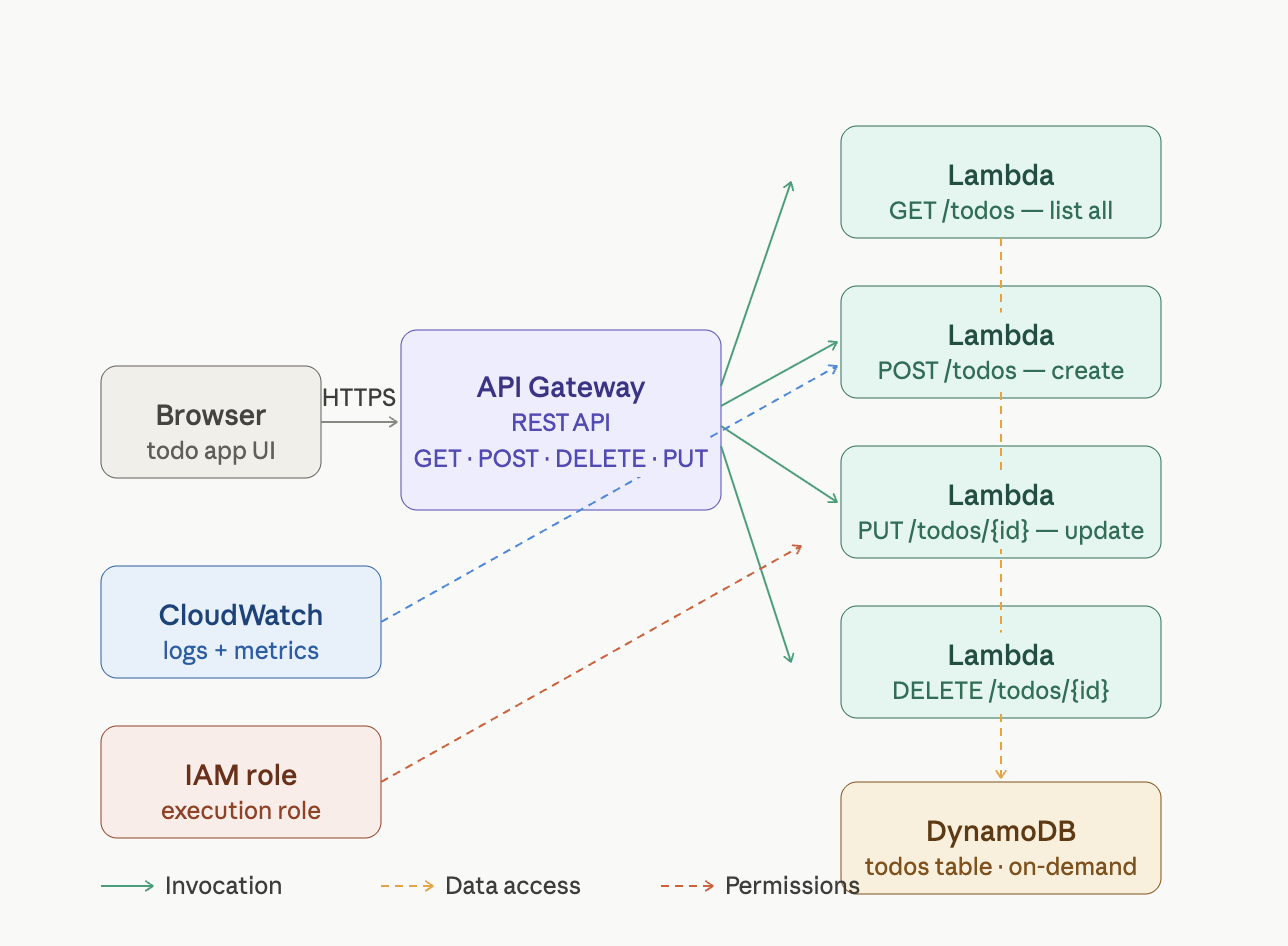
What I built
A working todo API with:
GET /todos— lists all todos, sorted bycreated_atPOST /todos— creates a todo with a UUID,pendingstatus, and UTC timestampPUT /todos/{id}— updates the status field (pending→complete)DELETE /todos/{id}— removes a todo by ID
Each item stored in DynamoDB looks like this:
{
  "id": "a1b2c3d4-e5f6-7890-abcd-ef1234567890",
  "title": "Learn DynamoDB",
  "status": "pending",
  "created_at": "2024-01-08T10:30:00+00:00"
}
No predefined schema. No column types enforced. The table only knows about id — everything else is flexible per item.
Step-by-step build
Step 1 — Create the DynamoDB table
Go to DynamoDB → Create table:
- Table name:
todos - Partition key:
id(String) - Capacity mode: On-demand
On-demand means DynamoDB scales from zero to any throughput automatically. No capacity planning. No idle cost. Perfect for serverless.
Step 2 — Create the IAM execution role
IAM → Roles → Create role → AWS service → Lambda
Attach AWSLambdaBasicExecutionRole then add this inline policy:
{
  "Version": "2012-10-17",
  "Statement": [{
    "Effect": "Allow",
    "Action": [
      "dynamodb:Scan",
      "dynamodb:GetItem",
      "dynamodb:PutItem",
      "dynamodb:UpdateItem",
      "dynamodb:DeleteItem"
    ],
    "Resource": "arn:aws:dynamodb:*:*:table/todos"
  }]
}
Name it day8-lambda-role.
⚠️ When creating Lambda functions, AWS auto-generates a new execution role for each one. Make sure to select "Use an existing role" and choose
day8-lambda-role— otherwise each function gets its own role with no DynamoDB permissions and you'll hitAccessDeniedExceptionon every call.
Step 3 — Create the four Lambda functions
Create each with Python 3.12, selecting day8-lambda-role as the execution role.
day8-list-todos:
import json, boto3

def lambda_handler(event, context):
    table = boto3.resource('dynamodb', region_name='eu-north-1').Table('todos')
    result = table.scan()
    items = sorted(result['Items'], key=lambda x: x.get('created_at', ''))
    return {
        'statusCode': 200,
        'headers': {
            'Content-Type': 'application/json',
            'Access-Control-Allow-Origin': '*'
        },
        'body': json.dumps(items)
}day8-create-todo:
import json, boto3, uuid
from datetime import datetime, timezone

def lambda_handler(event, context):
    body = json.loads(event['body'])
    item = {
        'id': str(uuid.uuid4()),
        'title': body['title'],
        'status': 'pending',
        'created_at': datetime.now(timezone.utc).isoformat()
    }
    boto3.resource('dynamodb', region_name='eu-north-1').Table('todos').put_item(Item=item)
    return {
        'statusCode': 201,
        'headers': {
            'Content-Type': 'application/json',
            'Access-Control-Allow-Origin': '*'
        },
        'body': json.dumps(item)
}day8-update-todo:
import json, boto3

def lambda_handler(event, context):
    todo_id = event['pathParameters']['id']
    body = json.loads(event['body'])
    table = boto3.resource('dynamodb', region_name='eu-north-1').Table('todos')
    result = table.update_item(
        Key={'id': todo_id},
        UpdateExpression='SET #s = :s',
        ExpressionAttributeNames={'#s': 'status'},
        ExpressionAttributeValues={':s': body.get('status', 'pending')},
        ReturnValues='ALL_NEW'
    )
    return {
        'statusCode': 200,
        'headers': {
            'Content-Type': 'application/json',
            'Access-Control-Allow-Origin': '*'
        },
        'body': json.dumps(result['Attributes'])
}day8-delete-todo:
import json, boto3

def lambda_handler(event, context):
    todo_id = event['pathParameters']['id']
    boto3.resource('dynamodb', region_name='eu-north-1').Table('todos').delete_item(
        Key={'id': todo_id}
    )
    return {
        'statusCode': 200,
        'headers': {
            'Content-Type': 'application/json',
            'Access-Control-Allow-Origin': '*'
        },
        'body': json.dumps({'deleted': todo_id})
    }
Click Deploy on each after pasting the code.
Step 4 — Create API Gateway
API Gateway → Create API → REST API → Build
- Name:
day8-todos-api - Build this structure with Lambda Proxy integration enabled on every method:
/todos
  GET    → day8-list-todos    ✅ Lambda Proxy
  POST   → day8-create-todo   ✅ Lambda Proxy
  /{id}
    PUT    → day8-update-todo  ✅ Lambda Proxy
    DELETE → day8-delete-todo  ✅ Lambda Proxy
Enable CORS on /todos and /todos/{id}. Deploy to a dev stage.
💡 Lambda Proxy integration must be explicitly ticked on every method. Without it
event['body']andevent['pathParameters']arrive asNoneand every function crashes with aKeyError.
Step 5 — Test the full flow
BASE="https://YOUR_ID.execute-api.eu-north-1.amazonaws.com/dev"

# Create three todos
curl -s -X POST $BASE/todos \
  -H "Content-Type: application/json" \
  -d '{"title": "Learn DynamoDB"}' | python3 -m json.tool

curl -s -X POST $BASE/todos \
  -H "Content-Type: application/json" \
  -d '{"title": "Build Day 8 project"}' | python3 -m json.tool

# List all — should show 2 items
curl -s $BASE/todos | python3 -m json.tool

# Mark first as complete (paste UUID from POST response)
curl -s -X PUT $BASE/todos/YOUR-UUID \
  -H "Content-Type: application/json" \
  -d '{"status": "complete"}' | python3 -m json.tool

# Delete second
curl -s -X DELETE $BASE/todos/YOUR-UUID

# Confirm final state
curl -s $BASE/todos | python3 -m json.tool
The bug I hit — and what it taught me about IAM
When I ran the first curl command I got Internal server error. CloudWatch showed:
AccessDeniedException: User: arn:aws:sts::686591366994:assumed-role/
day8-list-todos-role-c8n66hcn/day8-list-todos is not authorized to
perform: dynamodb:Scan on resource: arn:aws:dynamodb:eu-north-1:
686591366994:table/todos
The Lambda was using its auto-generated role (day8-list-todos-role-c8n66hcn) instead of the day8-lambda-role I created. When AWS creates a Lambda function, it generates a brand new role automatically unless you explicitly select an existing one. That auto-generated role had only CloudWatch permissions — no DynamoDB at all.
Fix: Lambda → Configuration → Permissions → Edit → change to day8-lambda-role on all four functions.
The lesson: always verify which IAM role a Lambda is actually using before testing. The role name in the CloudWatch error tells you exactly which one is being assumed.